
FireProtect Plus Jeweller
Supplier item link
A direct supplier item link has not been confirmed for this entry. A general supplier website is not an item link.
Troubleshooting – step by step
Smoke, heat and CO detector in the first FireProtect generation.
Wireless · Jeweller
Elotec article number and purchase price: not retrievedColor, frequency and availability must be confirmed.

Use and Maintenance
Arrange maintenance and any test with the monitoring station before opening equipment. Note the model and location. Opening a device may trigger tamper even when the intrusion alarm is disarmed.
Battery Exchange: Main Batteries CR2; Reserve CR2032. Confirm the number of your device.
- Remove the detector from SmartBracket and switch it off.
- Loosen the screws and remove the back cover.
- Replace the relevant battery group: CR2 for primary power or CR2032 for backup. Follow polarity markings.
- Close the cover, secure the screws and switch on. Refit the detector.
- Check battery and cover status and perform the manufacturer's functional test.
Use new, undamaged batteries. Do not mix new and old. Keep button cells unavailable for children. Battery status may take some time to update.
Original battery guide for this model
For installer: location and installation
- Check the exact model, panel, region and connection type.
- Open the original manual's location and installation section below.
- Follow the model's illustrations for mounting, wiring and tamper protection.
- Complete the relevant signal and functional tests before handover.
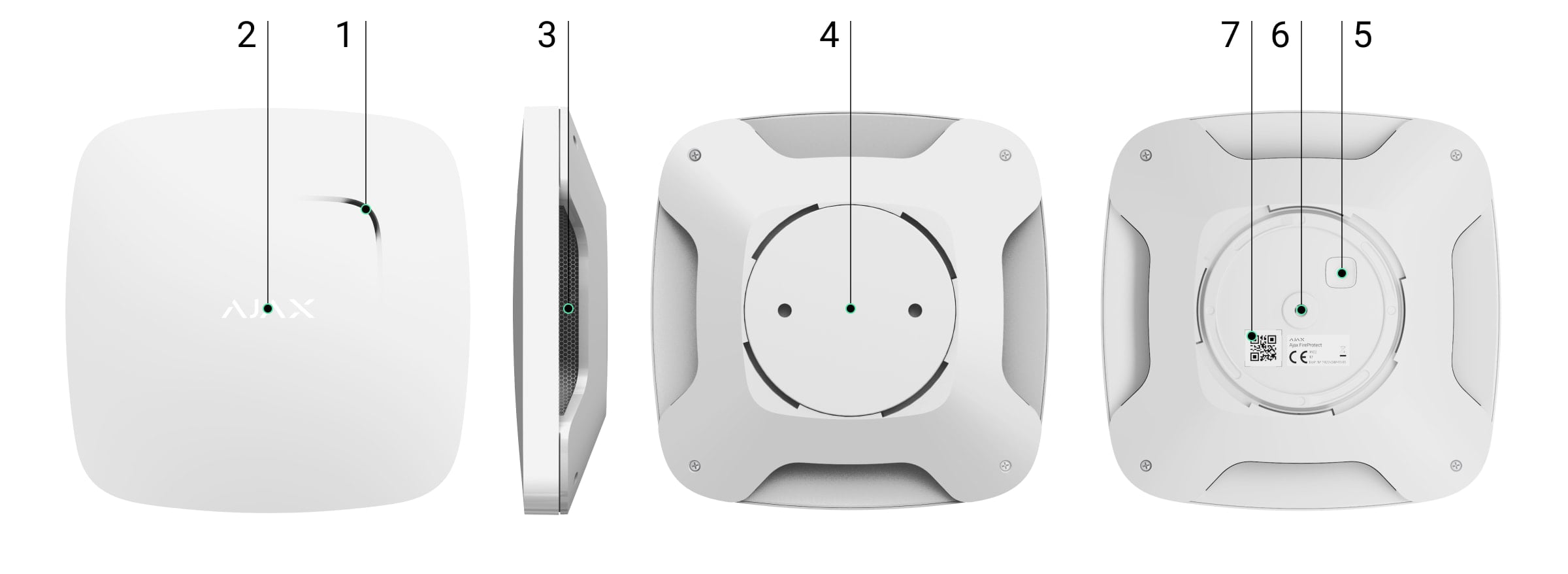
Documents and missing
- User guide
Norwegian maintenance summary. Not a complete replacement for the original manual.
- Originalmanual / installasjon
Model-specific original manual with illustrations.
- Tekniske spesifikasjoner
Online specifications. Check variant and region; separate datasheet-PDF is not verified.
- Produsent
Ajax Systems.
- Elotec
Suppliers provided by the Safety Group. Model Elotec article, product link and price have not been verified.
- Videos and software
General training channel. Model-specific film and own software connection are not verified.
Help when the product does not work
Choose the symptom and check the model scope before following the steps. This is troubleshooting, not a list of confirmed product defects.
App reports tamper / enclosure open
Applies to: Ajax device with tamper monitoring; only if the app shows Enclosure / Tamper
- Open Devices in the Ajax app, select the named device and read its enclosure/tamper state. Confirm the room and device.
- Look for a loose cover or mounting bracket, or recent removal. Do not open the device just to check the alert.
- If recently refitted, use the model mounting guide to seat it correctly. Arrange any opening with the monitoring service first.
- Check the app state after refitting. An old event in the log is not the same as an active fault.
Check the result: The current enclosure state is normal/closed.
Stop and get help: For a damaged bracket or persistent alert, contact the installer. Do not disable tamper monitoring to hide the fault.