
DMSS: save a video clip to your phone
For recordings you are authorised to export. The clip is saved to the phone; this does not send it to support.
For customers
Follow these steps
Find the camera and period in Playback. Tap the scissors icon.
Image status for this step
A dedicated image of this step has not been verified.
Move the timeline to the start and tap Play. Move to the end and tap Stop. Confirm saving with OK.
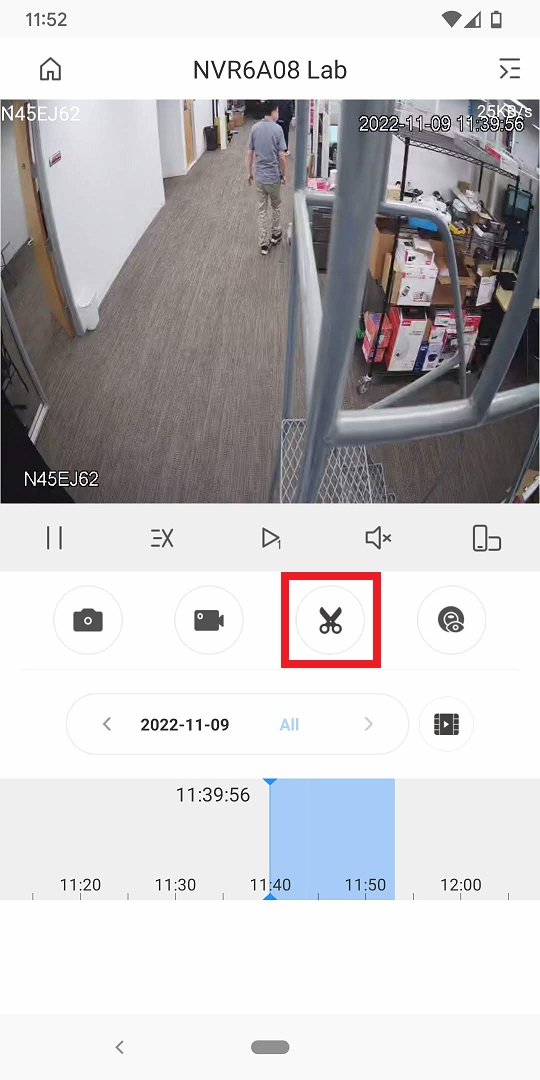
Original illustration from the source below. Menus and appearance may vary by version. Select to enlarge. · Source Wait for the download. Go to Me → My Files → Video.
Image status for this step
A dedicated image of this step has not been verified.
Select Edit, mark the clip and use Save to store it on the phone. Open the file and check the start, end and correct camera.
Image status for this step
A dedicated image of this step has not been verified.
What you should be able to confirm
The exported clip plays from the phone’s storage.
After service, confirm the result with the user and notify the system manager/monitoring station as agreed. One working function does not mean the whole case is resolved.
Watch the relevant procedure
Still not resolved?
If interrupted, check phone storage and required file permissions, then try a shorter clip. Preserve the original recording.
Prepare a support summary