
Yale Classic/V2N: restart the lock from outside
For a Classic/V2N that does not respond normally. This is a restart, not deletion of codes.
For customers
Follow these steps
If the batteries are dead, follow the emergency power guide first. Restarting does not replace power.
Image status for this step
A dedicated image of this step has not been verified.
Locate the small restart button between the emergency power contacts underneath the outside unit, labelled A in the drawing.
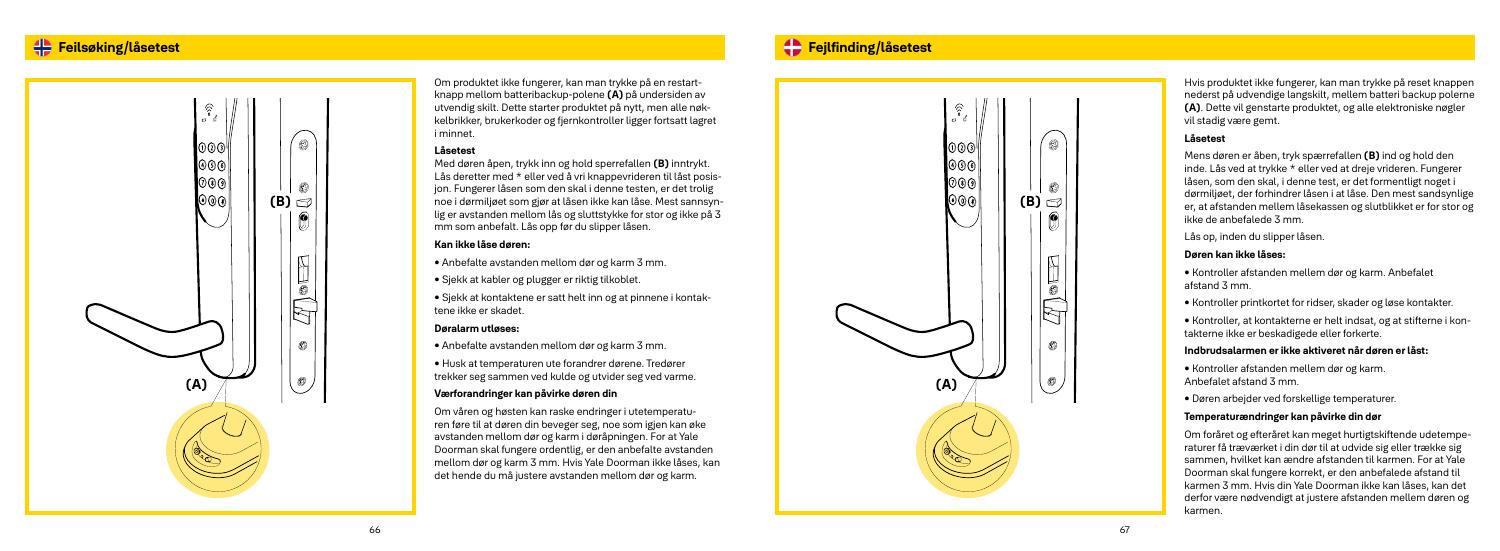
Original illustration from the source below. Menus and appearance may vary by version. Select to enlarge. · Source Press the exterior restart button as described by Yale. Do not substitute the P/programming button under the battery cover.
Image status for this step
A dedicated image of this step has not been verified.
When the lock responds again, try normal unlocking with valid access. Yale states that codes, tags and remotes are retained by this restart.
Image status for this step
A dedicated image of this step has not been verified.
What you should be able to confirm
The lock responds normally and existing access works.
After service, confirm the result with the user and notify the system manager/monitoring station as agreed. One working function does not mean the whole case is resolved.
Watch the relevant procedure
No dedicated troubleshooting video has been verified for this task. Use the specific written source below.
Still not resolved?
If the lock still does not respond, contact service. The original manual does not specify a hold duration; do not improvise a long reset sequence.
Prepare a support summary