
Yale L3: locks with door open but not closed
For a powered lock that will not complete locking. Keep the door open during the test.
For customers
Follow these steps
Use the original drawing to identify the trigger bolt. Press and hold it throughout the described lock test.
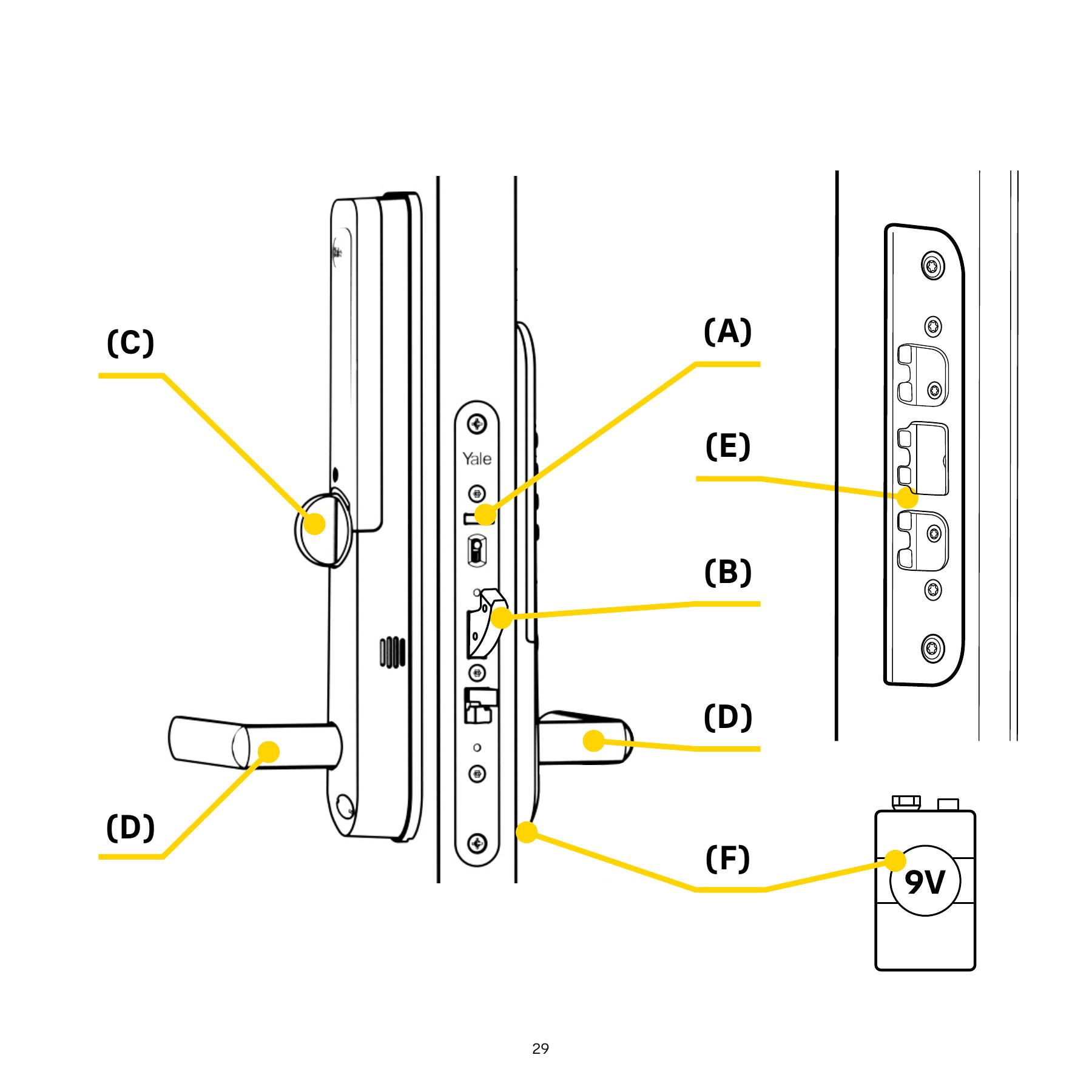
Original illustration from the source below. Menus and appearance may vary by version. Select to enlarge. · Source Lock using the inside thumbturn as specified in the model test. Check that the handle does not retract the locked hook bolt.
Image status for this step
A dedicated image of this step has not been verified.
Unlock again and retract the hook bolt with the handle before releasing the trigger bolt. Follow the order in the model’s original test.
Image status for this step
A dedicated image of this step has not been verified.
If the test works with the door open but not closed, the door gap and strike need checking. Ask an installer to adjust if the door requires force.
Image status for this step
A dedicated image of this step has not been verified.
What you should be able to confirm
The lock can lock and unlock without pushing or lifting the door.
After service, confirm the result with the user and notify the system manager/monitoring station as agreed. One working function does not mean the whole case is resolved.
Watch the relevant procedure
No dedicated troubleshooting video has been verified for this task. Use the specific written source below.
Still not resolved?
If the open-door test fails, have the lock checked before further use. State which part of the test failed.
Prepare a support summary