
Yale L3: dead batteries – open using 9 V
For Yale Doorman L3. You need a 9 V battery and a valid code or key tag.
For customers
Follow these steps
Locate the emergency power contacts underneath the outside lock unit. See label F in the original drawing below.
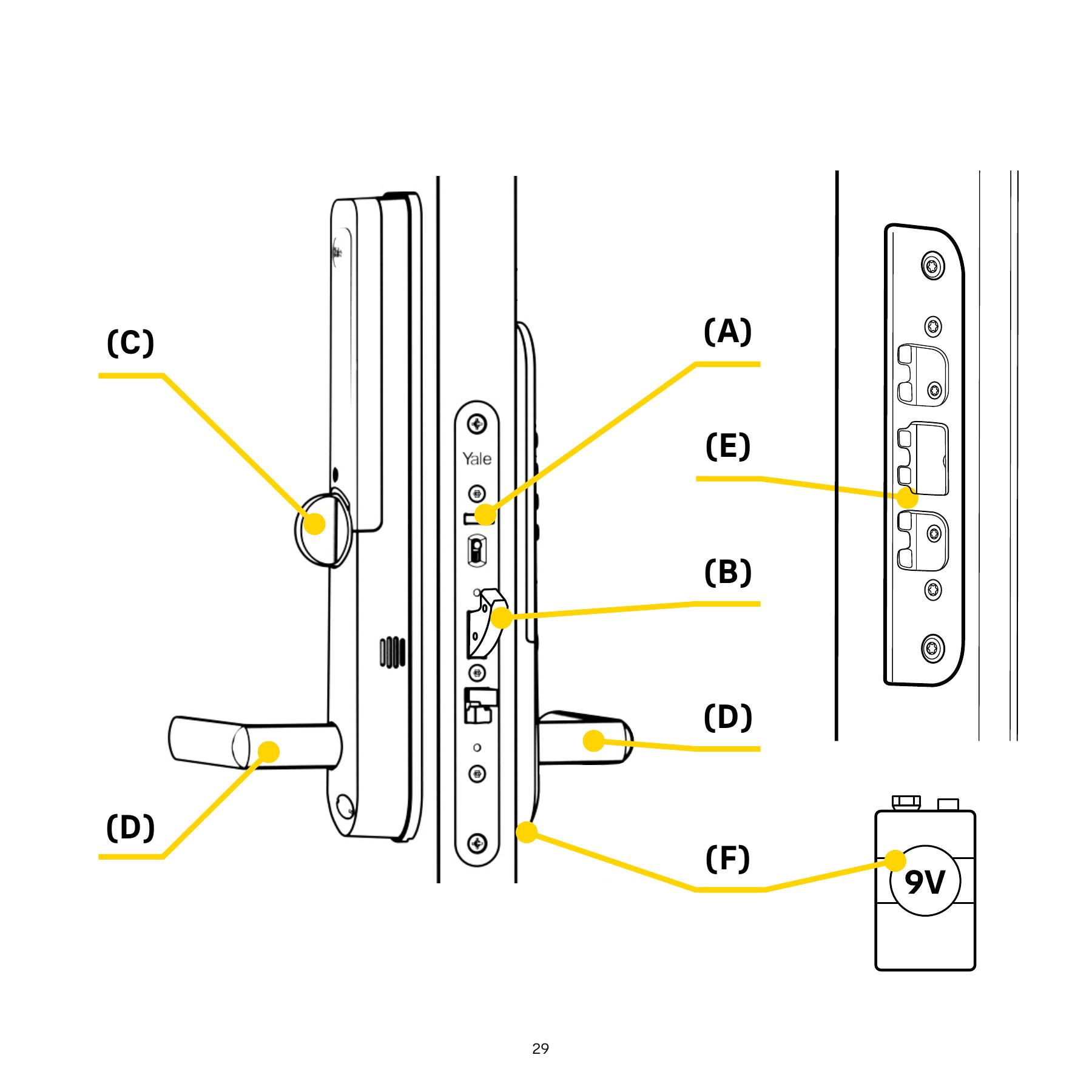
Original illustration from the source below. Menus and appearance may vary by version. Select to enlarge. · Source Hold the 9 V battery terminals against the two contacts as shown in the original drawing. The battery supplies temporary power while you operate the lock.
Original illustration from the source below. Menus and appearance may vary by version. Select to enlarge. · Source Use your normal valid code or key tag and unlock. Emergency power does not grant access without authorised identification.
Image status for this step
A dedicated image of this step has not been verified.
Once inside, replace the internal batteries following the model guide and check locking/unlocking with the door open before normal use.
Image status for this step
A dedicated image of this step has not been verified.
What you should be able to confirm
The lock responds to emergency power and opens with valid access.
After service, confirm the result with the user and notify the system manager/monitoring station as agreed. One working function does not mean the whole case is resolved.
Watch the relevant procedure
No dedicated troubleshooting video has been verified for this task. Use the specific written source below.
Still not resolved?
If there is still no response or a mechanical obstruction, contact service/a locksmith. Do not use force or a factory reset as emergency opening.
Prepare a support summary