
Danalock V3 — replace batteries
Troubleshooting – step by step
4 × 3 V CR123A · Panasonic / Duracell
- Ensure you retain safe access while working. Open the battery cover at the bottom of the lock.
- Pull the ribbons to remove the batteries. Replace all four with identical new disposable batteries. Follow the holder polarity.
- Refit the cover. The lock should flash white for approximately three seconds when batteries are inserted.
- Recalibrate and physically check locking and unlocking before finishing.
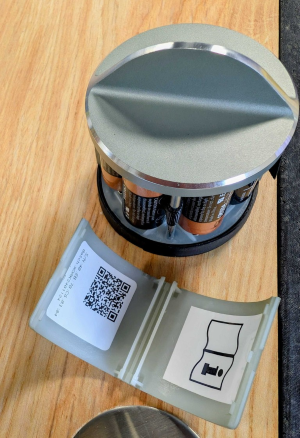
Do not mix old and new batteries or use rechargeable cells.
Continue to calibrationSalto: battery replacement with original image
Help when the product does not work
Choose the symptom and check the model scope before following the steps. This is troubleshooting, not a list of confirmed product defects.
Lock shows solid purple after an update
Applies to: Danalock V3. HomeKit without dual-mode requires a different procedure.
- Confirm the problem followed an interrupted update and identify the V3 variant before continuing.
- Solid purple can mean update mode. Follow Salto instructions for a manual update in Danalock Toolbox. Stay near the lock and retain backup access.
- Older HomeKit without dual-mode may show solid red and uses the manufacturer HomeKit/nRF instructions instead. Do not blindly apply the Toolbox procedure.
Check the result: The update completes and you confirm normal locking/unlocking with backup access available.
Stop and get help: If update mode persists, contact support with the variant and light pattern before further intervention.