
Danapad V3
Supplier item link
A direct supplier item link has not been confirmed for this entry. A general supplier website is not an item link.
Troubleshooting – step by step
Danapad V3 is a Bluetooth keypad for compatible Danalock locks.
Battery replacement: 4 × AAA
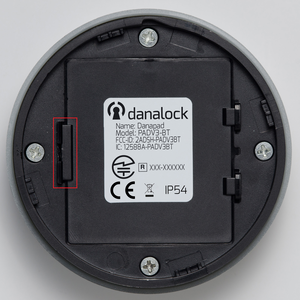
- Follow the mounting guide to release the panel from its bracket. Open the rear battery cover using a small flat screwdriver on the left side.
- Replace batteries with correct polarity, close the cover and securely refit the keypad. Test an agreed code.
A red blink can indicate an invalid code, a pause or lost connection. Five invalid PIN attempts cause a two-minute lockout.
Salto: batteries, indicators and troubleshooting
Mount and remove Danapad — step-by-step pictures
Salto: pair the keypad and create PIN codes
Help when the product does not work
Choose the symptom and check the model scope before following the steps. This is troubleshooting, not a list of confirmed product defects.
Danapad flashes red or rejects a PIN
Applies to: Danapad V3
- Stop repeated code attempts. After five invalid PINs, Danapad locks for two minutes.
- Confirm with the owner that the code is valid and belongs to this lock. Test after the lockout period.
- If the correct code is still rejected, check battery and lock connection using the model guide. Red flashing alone does not distinguish all causes.
Check the result: The agreed code opens the correct lock.
Stop and get help: Contact support if the fault remains; do not publish or include your PIN in the fault report.
Sources: support.saltosystems.com — open documentation support.saltosystems.com — open documentation support.saltosystems.com — open documentation