
Arm or disarm the alarm
← More tasks for the same user
Before you start: Have access to the correct system and area. Use your personal account.
Home mode must be configured for the system. If the app reports an open door or fault, investigate the cause; do not bypass sensors just to arm. Vesta's 2026 information describes padlocks replacing shields. Read the status text because icons vary by app version.
iPhone: design can vary with iOS and SmartHomeSec version. The steps below describe documented features.
Steps
- Open Security.
- Select the correct Area. If you have several areas, the selection applies only to the area shown.
- Select Disarm to disarm, Arm when leaving the area, or Home for the agreed partial arming mode.
- Enter your personal alarm code if the app requests a PIN.
- Wait for confirmation and read the new status. When arming, follow any exit delay.
You should see this: The area shows the requested state. A tap without confirmed status does not prove that the alarm state changed.
If it does not work
- Open zone or fault: read the device name and establish the cause.
- No confirmation: check the connection and contact the installer; do not assume the alarm state changed.
Older screenshots – only show as reference
This is not the documentation of today's menu location.
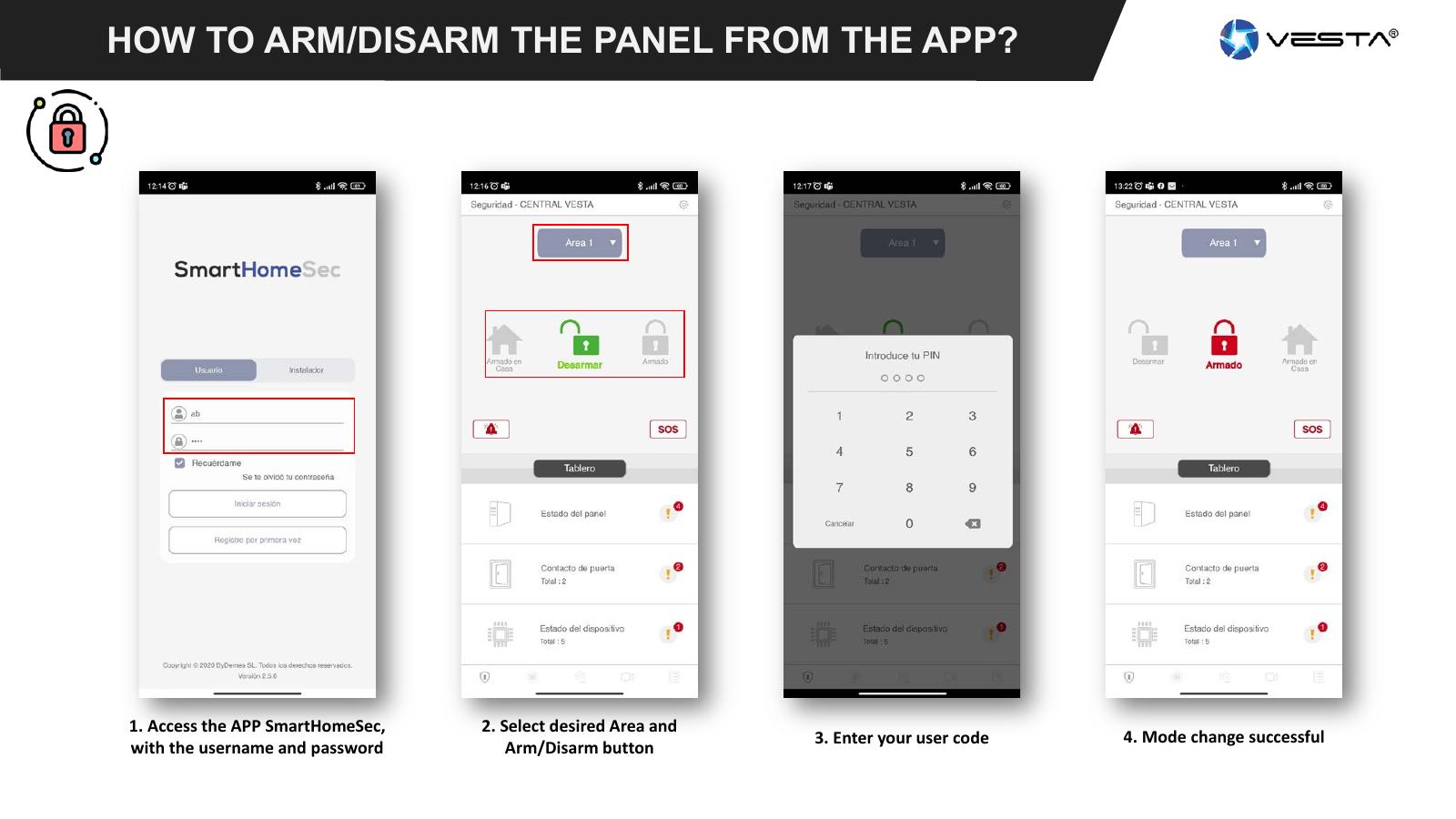
Updated screenshot for this task: missing.
Source Base and Date
The guide is compiled from the sources below. Menu selection from older PDFs is not confirmed in today's edition.
- SmartHomeSec User’s Guide – Vesta, kopi hos BNT — Date not specified; older app interface
- Vesta: FW 35D and changes in the interface — 18.03.2026 · oppdatert 20.05.2026
Reviewed 08.09.2026. Control against demo plants: not performed.
Something not working?
Choose the symptom. Always check the model and connection before following a procedure.
Images, videos and sources
Images or figures are present on this page. Check the caption for model and version.
No direct troubleshooting video is registered on this page. A general manual is not labelled a troubleshooting video.